
Social media blocker
Block social media apps during the hours that matter
You don't need to delete Instagram or quit TikTok forever. You need them unavailable at 11pm on a Tuesday and during tomorrow's deep work block. Bloky pauses your social apps on a schedule you set once — and gives them back when the time is right.
Deleting social media doesn't work. Scheduling it does.
The delete-reinstall cycle is familiar to almost everyone who's tried to cut back: delete Instagram on Sunday night, feel virtuous until Thursday, reinstall "just to check something," and be back to two hours a day by the weekend. Cold turkey fails because these apps also carry real value — friends, messages, communities you actually care about.
The problem was never the apps existing. It's when they're available: in bed when you should be asleep, at your desk when you should be working, at dinner when you should be present. Solve the when and the apps go back to being tools.
That's what schedule-based blocking does. Instagram at 2pm on a Saturday is a choice; Instagram at midnight is a trap. Bloky lets you keep the first and block the second — for every social app at once.
How Bloky handles social media
Block one app or all of them, on the schedule that fits your life.
All your social apps in one list
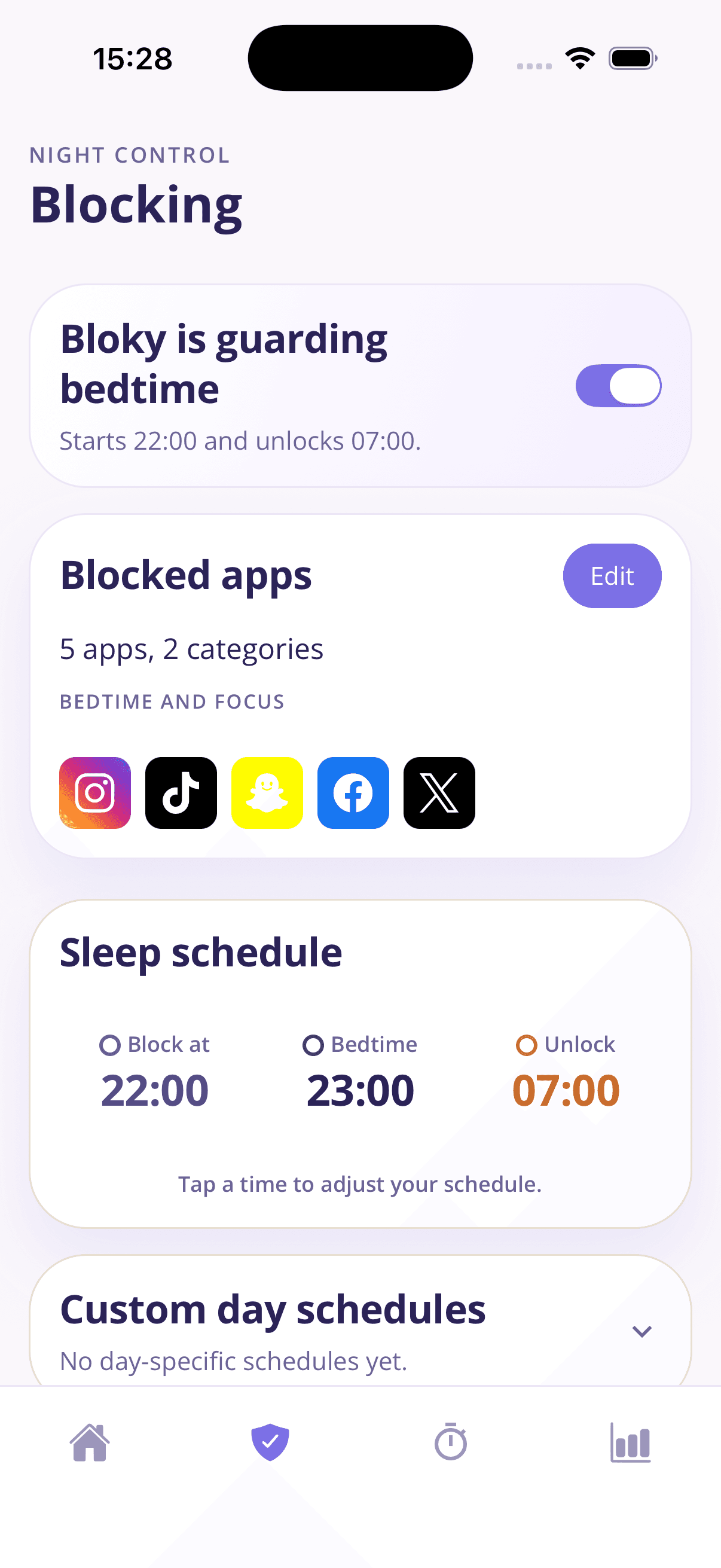
Instagram, TikTok, Snapchat, Facebook, X — add them individually or block the whole social category in one tap.
A schedule, not a ban
Social apps pause at your chosen evening hour and return in the morning. You're not quitting; you're putting the feeds on office hours.
Different rules for different days
Custom day schedules let weekend evenings run later than school or work nights. Realistic rules are the ones that survive.
Focus sessions for the daytime pull
Before study or deep work, start a focus session from 15 minutes to 4 hours and the feeds stay quiet until you're done.
Friction that respects you
Need Instagram during a block — for a real reason? Tap Bloky 20 times for a 5-minute pass. Reflexive checks don't survive 20 taps; real needs do.
See the hours come back
The weekly Bloky Report shows exactly how much less time the feeds are taking. The number falling week over week is the whole point, made visible.
Put your feeds on a schedule
- 1
Add your social apps
Select each app or block the whole social category at once.
- 2
Choose your windows
Set the nightly block schedule, plus custom days if weekends differ.
- 3
Enjoy the quiet
The feeds pause on time, every time. Check your report as the hours return.
Frequently asked questions
Common questions about blocking social media without going cold turkey.
How do I block social media apps at night?
- Use a blocker with a real schedule. In Bloky you add your social apps to the blocked list, set a start time like 22:00 and an unlock time like 07:00, and every night the apps pause automatically. Unlike in-app "take a break" reminders, the block shows a pause screen you can't dismiss with one tap.
Can I block Instagram and TikTok at the same time?
- Yes. Bloky blocks any combination of apps on the same schedule — most people block Instagram, TikTok, and Snapchat together as one bedtime list. You can also sweep in a whole category so new time-sink apps get caught automatically.
How do I block social media during work or study hours?
- Bloky's focus sessions handle this: start one for 15 minutes to 4 hours and your chosen apps stay blocked until it ends. It's the same engine as the night schedule, pointed at your workday. Many users run a night schedule plus a couple of focus sessions daily.
Should I just delete my social media apps instead?
- If deleting worked for you, you'd have done it once and been done. For most people the delete-reinstall cycle proves the apps have real value mixed with the compulsion. Scheduled blocking keeps the value (daytime, deliberate use) and removes the harm (midnight autopilot) — which is why it sticks where cold turkey fails.
Do Instagram's and TikTok's built-in time limits work?
- They're better than nothing but easy to bypass — both apps let you dismiss or extend the limit in a tap or two, and they only cover themselves. An external blocker like Bloky covers all your social apps with one schedule and adds real friction: a 5-minute pass costs 20 deliberate taps.
Will blocking social media at night help me sleep?
- Social feeds are the single biggest driver of bedtime screen time, and sleep research links that scrolling directly to later bedtimes and worse rest. Block the feeds during your wind-down and you remove the strongest trigger. Bloky's weekly report shows the result in your own numbers within a week or two.
Learn more
Guides that go deeper on the habit behind the problem.
How to block TikTok
Every way to block TikTok: built-in screen time limits, TikTok's own tools, and scheduled app blockers — with honest notes on which ones actually hold.
How to block Instagram
Block Instagram at night, during work, or on a schedule — every method for iPhone and Android compared, and why scheduled blocking beats quitting cold turkey.
How to stop scrolling at night
Can't stop scrolling in bed? A practical 5-step plan: why willpower fails at night, how to set a digital sunset, and how to make the change stick within a week.
Related solutions
Download Bloky
Keep your apps. Lose the 1am scroll.
Download Bloky and put your social media on a schedule tonight — free to try on iPhone and Android.
Free to download on the App Store and Google Play. Premium includes a 3-day free trial.